What is n8n?
If you’ve been spending too much money on Zapier, hitting limits on Make, or simply looking for a smarter way to automate your work — you’ve probably stumbled across the name n8n.
But what exactly is n8n? Is it really free? Can a complete beginner use it? And why is everyone in the automation space suddenly talking about it?
In this guide, we’ll answer all of those questions and more. By the end, you’ll know exactly what n8n is, how it works, who it’s for, and how to get started — even if you’ve never built a workflow in your life.
Let’s dive in.
What is n8n?
n8n (pronounced “n-eight-n”) is a free, open-source workflow automation platform that lets you connect apps, automate repetitive tasks, and build powerful multi-step workflows — all through a visual drag-and-drop interface.
The name stands for “nodemation” — a combination of node (the building blocks of every workflow) and automation. It was built on Node.js and released in 2019 by Jan Oberhauser with a simple mission: give everyone the power of automation without the limitations of existing tools.
In plain terms: n8n lets you make apps talk to each other and do things automatically, so you don’t have to do them manually.
A Simple Example
Imagine you run an online store. Every time someone fills out your contact form, you want to:
- Add their details to a Google Sheet
- Send them a welcome email
- Notify your team in Slack
Without automation, you’d do all three steps manually. With n8n, you build a workflow once — and it runs automatically, every time, forever.
That’s the power of n8n.
How Does n8n Work?
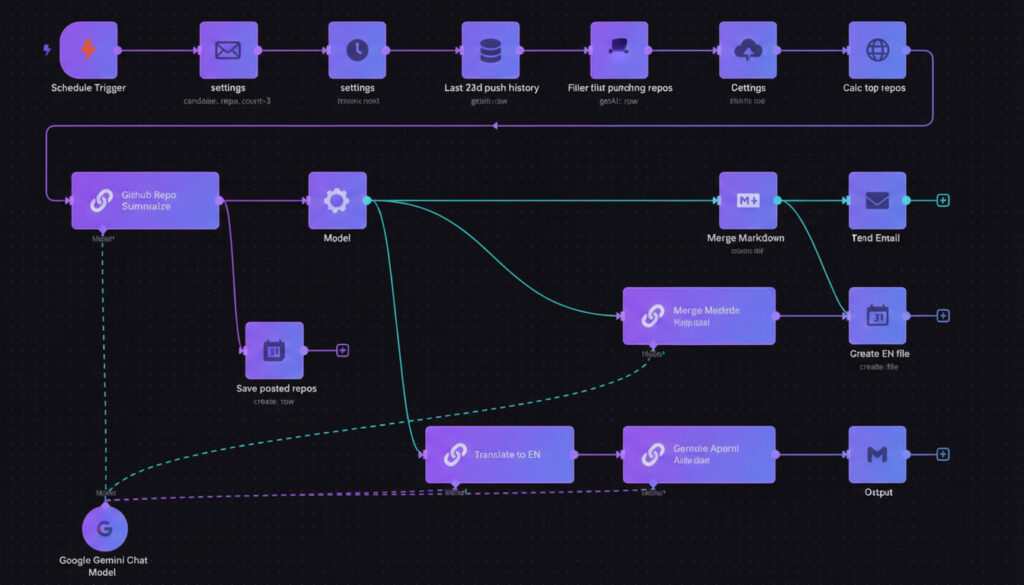
n8n is built around a concept called nodes. Every action in n8n is a node — sending an email is a node, reading from a spreadsheet is a node, calling an API is a node.
You connect nodes together on a visual canvas to create a workflow — a sequence of automated steps that run whenever a trigger fires.
Every n8n workflow has three key parts:
1. Trigger Node The event that starts the workflow. This could be a form submission, a new email, a scheduled time, a webhook call, or even a message in Slack.
2. Action Nodes The steps that happen after the trigger. Add a row to Google Sheets, send an email via Gmail, post a message to Slack, call an OpenAI API — each step is an action node.
3. Logic Nodes Conditions, filters, loops, and switches that control the flow. For example: “If the email contains the word ‘urgent’, route it to the priority queue.”
You build all of this by dragging nodes onto the canvas and connecting them with lines — no coding required, unless you want to add custom logic with JavaScript or Python.
What Makes n8n Different?
The automation tool market is crowded. So why is n8n growing so fast? Here are the features that set it apart:
✅ Completely Free to Self-Host
This is the biggest difference. n8n is free to run on your own server. Unlike Zapier — which charges you per task — or Make — which limits your executions — self-hosted n8n has no task limits, no per-execution fees, and no expiry. You own your automation infrastructure completely.
✅ Open Source
n8n’s code is publicly available on GitHub under a fair-code license. This means total transparency, an active community of contributors, and the freedom to customize n8n to fit your exact needs.
✅ 400+ Integrations Built In
n8n ships with native integrations for over 400 popular apps including Gmail, Slack, Notion, HubSpot, Google Sheets, Airtable, Shopify, Telegram, WhatsApp, WordPress, and hundreds more. And if an app isn’t on the list, the HTTP node lets you connect to any service with a public API.
✅ Native AI & LLM Support
n8n 2.0 (released January 2026) introduced 70+ AI nodes, native LangChain integration, persistent agent memory, and support for self-hosted LLMs like Ollama, Mistral, and LLaMA. You can now build real AI agents — not just simple chatbots — directly inside n8n workflows.
✅ Code When You Need It
Unlike Zapier’s locked black-box approach, n8n lets you drop JavaScript or Python directly into any workflow node. This means you can handle complex data transformations, custom logic, or API calls that no-code tools simply can’t manage.
✅ No Per-Task Pricing
Zapier charges you every time a Zap runs. At scale, that gets expensive fast. With n8n self-hosted, your only cost is the server — typically $5–$10/month on a basic VPS. For high-volume automation, this saves thousands per year.
n8n vs Zapier vs Make — Quick Comparison
| Feature | n8n | Zapier | Make |
|---|---|---|---|
| Free Self-Hosting | ✅ Yes | ❌ No | ❌ No |
| Open Source | ✅ Yes | ❌ No | ❌ No |
| Native AI Nodes | ✅ 70+ | ⚠️ Limited | ⚠️ Limited |
| Custom Code | ✅ JS + Python | ❌ No | ⚠️ Limited |
| Integrations | 400+ | 7,000+ | 1,500+ |
| Cloud Free Plan | ✅ Trial | ✅ Limited | ✅ Limited |
| Starting Price | Free (self-host) | $20/mo | $9/mo |
| Task Limits | ❌ None (self-host) | ✅ Yes | ✅ Yes |
The short version: Zapier is the easiest but most expensive. Make is a middle ground. n8n is the most powerful and the most affordable — especially if you self-host.
Who is n8n For?
n8n isn’t just for developers. It’s designed to serve a wide range of users:
🟢 Beginners & Non-Technical Users The visual editor makes building workflows intuitive. If you can drag and drop, you can build your first automation. N8N Master’s beginner guides walk you through everything from zero.
🔵 Developers & Engineers n8n’s code node, REST API, webhook support, and self-hosting options make it the go-to tool for technical teams who need automation that doesn’t compromise on flexibility.
🟠 Business Owners & Solopreneurs Stop paying for five different SaaS tools to do things that n8n can handle in one workflow. Automate your lead gen, CRM, client onboarding, invoicing, and reporting — all for the price of a $5/month server.
🟣 Agencies & Freelancers Build powerful white-label automation solutions for clients. Self-host n8n on your own infrastructure and offer automation as a service without per-task costs eating your margin.
What Can You Build with n8n?
Here are just a few real-world examples of what people build with n8n every day:
- Lead Generation Machine — Scrape leads from LinkedIn, enrich them with contact data, add to HubSpot CRM, send personalized email sequences automatically
- AI Customer Support Bot — Connect n8n to OpenAI + your knowledge base to answer customer emails with accurate, context-aware responses 24/7
- Automated Reporting — Pull data from Google Analytics, Stripe, and your CRM every Monday morning and send a formatted report to Slack
- E-commerce Automation — Trigger Shopify order confirmations, update inventory in Airtable, and notify your warehouse team via Telegram
- Content Publishing Workflow — Take a blog draft from Notion, generate an SEO meta description with AI, and publish to WordPress automatically
- Social Media Scheduler — Auto-post content to Twitter/X, LinkedIn, and Instagram from a single Google Sheet content calendar
The possibilities are genuinely endless — and that’s not a cliché. n8n’s flexibility means if you can describe the workflow in words, you can almost certainly build it in n8n.
Frequently Asked Questions About n8n
Is n8n completely free? Yes — n8n is free to self-host with no limitations on executions or workflows. Cloud plans start at $20/month. There are no per-task fees on the self-hosted version.
Is n8n hard to learn? No. The visual drag-and-drop editor makes n8n accessible to beginners. Most people build their first working workflow within 30 minutes of starting. N8N Master’s tutorials are designed to get you there even faster.
Is n8n better than Zapier? For most use cases — especially at scale or for technical users — yes. n8n is more flexible, supports custom code, can be self-hosted for free, and now has native AI capabilities that Zapier can’t match. Zapier has more integrations (7,000+), which matters if you use niche apps.
Can n8n handle AI workflows? Absolutely. n8n 2.0 includes 70+ AI nodes with native LangChain integration. You can build AI agents, RAG pipelines, LLM-powered chatbots, and intelligent document processors directly inside n8n — using OpenAI, Claude, Gemini, or self-hosted models.
Do I need to know how to code to use n8n? No. The visual editor handles most use cases without any code. However, n8n does allow JavaScript and Python in code nodes for advanced users who want to add custom logic — making it the best tool for both non-technical and technical users.
Conclusion
n8n is one of those rare tools that genuinely changes how you work.
It’s free. It’s open source. It’s self-hostable. It has native AI built in. And it’s powerful enough to replace an entire stack of expensive SaaS subscriptions — while giving you complete control over your data and your automations.
Whether you’re a solopreneur looking to save 10 hours a week, a developer building complex pipelines, or a business owner tired of doing the same manual tasks every day — n8n has something for you.
And you’re in the right place to learn it.
Ready to build your first n8n workflow? 👉 [Start with our Beginner’s n8n Tutorial →] 👉 [Browse Free n8n Workflow Templates →] 👉 [Learn How to Self-Host n8n with Docker →]